When local or global temporary tables are created or dropped, its metadata are inserted or removed from the tempdb system catalog. If there is a very high rate of workload trying to create and drop temporary tables, this can lead to Data Definition Language (DDL) contention in the tempdb system catalog and throttle the workload throughput.
This tip will describe the condition to allow caching of temporary table and a demonstration to benchmark the performance between a cached vs. non-cached temporary table.
Solution
Caching of a temporary table is a feature available since SQL Server 2005. If certain conditions are met, the temporary table metadata will still remain in the tempdb system catalog when the user request has completed its task. From the user's perspective, the temporary table is no longer accessible as if the temporary table was dropped. But when a user session calls the same routine again that creates the temporary table, SQL Server internally can reuse the temporary table created earlier.
The conditions to allow caching of temporary table are:
Named constraints are not created
DDL statements that affect the table are not run after the temporary table has been created, such as the CREATE INDEX or CREATE STATISTICS statements
Temporary table is not created by using dynamic SQL
Temporary table is created inside another object, such as a stored procedure or trigger
Developers could write efficient queries, but because the temporary table caching feature works internally in SQL Server, it is not easily noticeable unless there is an awareness of this built-in feature and the condition to allow caching of a temporary table.
DDL Performance Between Cached vs. Non-Cached Temporary Table in SQL Server
The demonstration will be using a stored procedure which contains DDL only to benchmark the performance difference. This is also an example use case where caching of a temporary table can provide significant performance improvement on workloads that loop to process large amounts of records concurrently in a few batches. This tip is not stating the example is a good or bad design, but the focus is on demonstrating the behavior of temporary table caching.
All the T-SQL written in this tip is executed on SQL Server 2016 Enterprise RTM.
Two stored procedures are created with DDL definitions only as below:
USE tempdb
GO

CREATE PROCEDURE dbo.pr_NewTempTable
AS
BEGIN
 SET NOCOUNT ON;

 CREATE TABLE #T (A INT IDENTITY(1,1), val varchar(20))

 CREATE UNIQUE CLUSTERED INDEX AA ON #T (A)

END
GO

CREATE PROCEDURE dbo.pr_CachedTempTable
AS
BEGIN
 SET NOCOUNT ON;

 CREATE TABLE #T (A INT IDENTITY(1,1) PRIMARY KEY CLUSTERED, val varchar(20))

END
GO
Query SQL Server sys.dm_os_performance_counters DMV to get the Temp Tables Creation Rate counter. SQL Server service was restarted prior to this test so that counter is showing 0.
SELECT * FROM sys.dm_os_performance_counters
WHERE counter_name = 'Temp Tables Creation Rate'
AND OBJECT_NAME = 'SQLServer:General Statistics'
GO
Open a new query session and execute the stored procedure dbo.pr_NewTempTable 100 times and check the Temp Tables Creation Rate counter again. The counter has incremented by 100 as a result of temp tables created from each of the dbo.pr_NewTempTable executions. The temporary table is not cached in this stored procedure due to DDL statement on the temporary table.
EXEC tempdb.dbo.pr_NewTempTable
GO 100

SELECT * FROM sys.dm_os_performance_counters
WHERE counter_name = 'Temp Tables Creation Rate'
AND OBJECT_NAME = 'SQLServer:General Statistics'
GO
Execute the stored procedure dbo.pr_CachedTempTable 100 times and this time SQL Server will show the Temp Tables Creation Rate has only incremented by one, because the temp table was cached and reused.
EXEC tempdb.dbo.pr_CachedTempTable
GO 100

SELECT * FROM sys.dm_os_performance_counters
WHERE counter_name = 'Temp Tables Creation Rate'
AND OBJECT_NAME = 'SQLServer:General Statistics'
GO
Assume stored procedure pr_CachedTempTable is executed concurrently at the same time in three different query sessions, then the Temp Tables Creation Rate counter will increase by three. If at any point in time the concurrent execution of pr_CachedTempTable is equal or less than three, then you will not see the counter Temp Tables Creation Rate increase. So, SQL Server will automatically create additional cached temporary tables to cater for concurrent requests.
To illustrate tempdb DDL contention, we will open three new query sessions and start the execution of dbo.pr_NewTempTable10,000 times under each session around the same time. The same test is repeated for dbo.pr_CachedTempTable and the ad-hoc query below.
-- Ad-Hoc Query
SET NOCOUNT ON;
DECLARE @i int = 1

WHILE @i <= 10000
BEGIN
 CREATE TABLE #T (A INT IDENTITY(1,1) PRIMARY KEY CLUSTERED, val varchar(20))
 DROP TABLE #T

 SET @i += 1
END
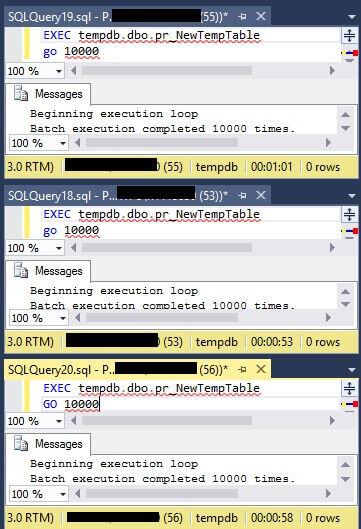
Below is a screenshot of dbo.pr_NewTempTable execution across three query sessions. All three sessions execution were started around the same time to simulate concurrent execution.
Below are the execution duration captured for the execution of dbo.pr_NewTempTable, dbo.pr_CachedTempTable and the ad-hoc query. DDL performance for cached temporary tables obviously has a noticeable shorter duration compared to a temporary table which is not cached.
Run#1
Run#2
Run#3
EXEC tempdb.dbo.pr_NewTempTable
61 seconds
53 seconds
58 seconds
EXEC tempdb.dbo.pr_CachedTempTable
20 seconds
21 seconds
22 seconds
Ad-hoc Query
65 seconds
55 seconds
65 seconds
Summary
DDL contention occurs when a high number of threads trying to access and update the SQL Server tempdb system catalog due to creation and dropping of temporary tables. This should not be confused with tempdb DML contention which typically relates to contention in PFS, SGAM or GAM pages.
In the demonstration, the temporary table pr_NewTempTable was unable to cache the temporary table, because it was mixing DDL with DML. By replacing the DDL "CREATE UNIQUE CLUSTERED INDEX" with the "PRIMARY KEY" constraint, the DDL becomes an inline statement and SQL Server was able to cache the temporary table.
However, not all DDL prevents the caching of a temporary table. An exception is the "DROP TABLE" DDL which still allows a temporary table to be cached. This means if there was an explicit "DROP TABLE #T" specified in pr_CachedTempTable, SQL Server would still be able to cache and reuse temporary table #T.
ASP.NET Web API, ASP.NET MVC ile paketlenmiştir olsa da, Web API'si için geleneksel bir ASP.NET Web Forms uygulaması eklemek kolay bir işlemdir.Bu öğreticide, adım adım açıklanmaktadır.
Genel Bakış
Bir Web Forms uygulaması'nda Web API'sini kullanmak için iki ana adım vardır:
Türetilen bir Web API denetleyicisi ekleme ApiController sınıfı.
Bir rota tablosuna ekleme uygulama_Başlat yöntemi.
Web Forms projesi oluşturun
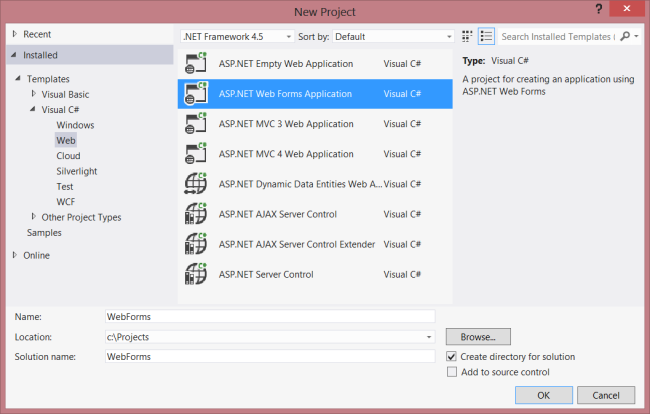
Visual Studio'yu başlatın ve seçin yeni proje gelen Başlat sayfası.Veya dosya menüsünde yeni ardından proje.
İçinde şablonları bölmesinde yüklü şablonlar genişletin Visual C# düğümü.Altında Visual C# seçin Web.Proje şablonları listesinde seçin ASP.NET Web Forms uygulaması.Proje için bir ad girin ve tıklayın Tamam.
Model ve denetleyici oluşturma
Bu öğreticide aynı model ve denetleyici sınıflar olarak Başlarken öğretici.
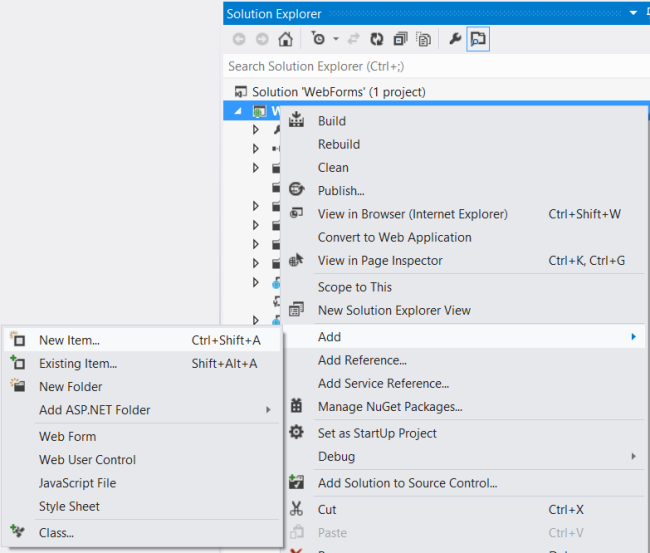
İlk olarak, bir model sınıfı ekleyin.İçinde Çözüm Gezgini, projeye sağ tıklayıp seçin sınıfı Ekle.' % S'sınıfı ürün adı ve aşağıdaki uygulama ekleyin:
Ardından, bir Web API denetleyicisi proje, A ekleyin. denetleyicisi Web API'si için HTTP isteklerini işleyen nesne.
İçinde Çözüm Gezgini, projeye sağ tıklayın.Seçin Add New Item.
Altında yüklü şablonlar, genişletme Visual C# seçip Web.Şablonlar listesinden seçip Web API denetleyici sınıfı.Denetleyici "ProductsController" adını verin ve tıklayın Ekle.
Yeni Öğe Ekle Sihirbazı ProductsController.cs adlı bir dosya oluşturur.Sihirbaz dahil yöntemleri silin ve aşağıdaki yöntemleri ekleyin:
C#
namespaceWebForms
{
using System;
using System.Collections.Generic;
using System.Linq;
using System.Net;
using System.Net.Http;
using System.Web.Http;
publicclassProductsController : ApiController
{
Product[] products = new Product[]
{
new Product { Id = 1, Name = "Tomato Soup", Category = "Groceries", Price = 1 },
new Product { Id = 2, Name = "Yo-yo", Category = "Toys", Price = 3.75M },
new Product { Id = 3, Name = "Hammer", Category = "Hardware", Price = 16.99M }
};
public IEnumerable<Product> GetAllProducts()
{
return products;
}
public Product GetProductById(int id)
{
var product = products.FirstOrDefault((p) => p.Id == id);
if (product == null)
{
thrownew HttpResponseException(HttpStatusCode.NotFound);
}
return product;
}
public IEnumerable<Product> GetProductsByCategory(string category)
{
return products.Where(
(p) => string.Equals(p.Category, category,
StringComparison.OrdinalIgnoreCase));
}
}
}
Bu denetleyicideki kod hakkında daha fazla bilgi için bkz. Başlarken öğretici.
Yönlendirme bilgileri
Ardından, URI yolu şekilde ekleyeceğiz, bir URI'leri formun "/API'si/ürünler/" denetleyiciye yönlendirilir.
İçinde Çözüm Gezgini, Global.asax Global.asax.cs arka plan kod dosyasını açmak için çift tıklayın.Aşağıdaki kullanarak deyimi.
C#
using System.Web.Http;
Ardından aşağıdaki kodu ekleyin uygulama_Başlat yöntemi:
C#
RouteTable.Routes.MapHttpRoute(
    name: "DefaultApi",
    routeTemplate: "api/{controller}/{id}",
    defaults: new { id = System.Web.Http.RouteParameter.Optional }
);
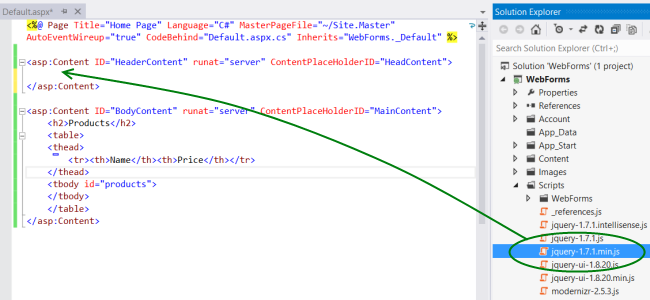
Not: Kolayca betik başvurusu dosyasından sürükleyip bırakarak ekleyebilirsiniz Çözüm Gezgini içine kod düzenleyicisi penceresi.
Aşağıdaki komut dosyası bloğu jQuery komut dosyası etiketi ekleyin:
HTML
<scripttype="text/javascript">function getProducts() {
$.getJSON("api/products",
function (data) {
$('#products').empty(); // Clear the table body.// Loop through the list of products.
$.each(data, function (key, val) {
// Add a table row for the product.var row = '<td>' + val.Name + '</td><td>' + val.Price + '</td>';
$('<tr/>', { html: row }) // Append the name.
.appendTo($('#products'));
});
});
}
$(document).ready(getProducts);
</script>
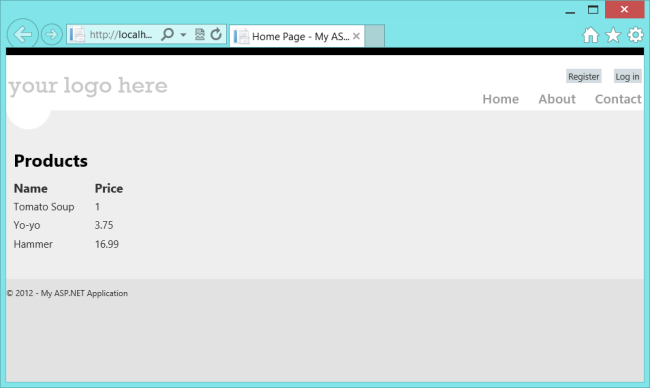
Belge yüklendiğinde bu betik bir AJAX isteğinde bulunur. "API/ürünleri".İstek, JSON biçiminde ürünlerin listesini döndürür.Betik, ürün bilgisi HTML tablosuna ekler.
Uygulamayı çalıştırdığınızda, şu şekilde görünmelidir:
ekrem pehlivan
evren pehlivan Use ASP.NET Core 2 to create durable and cross-platform web APIs through a series of applied, practical scenarios. Examples in this book help you build APIs that are fast and scalable. You'll progress from the basics of the framework through to solving the complex problems encountered in implementing secure RESTful services. The book is packed full of examples showing how Microsoft's ground-up rewrite of ASP.NET Core 2 enables native cross-platform applications that are fast and modular, allowing your cloud-ready server applications to scale as your business grows.
Major topics covered in the book include the fundamentals and core concepts of ASP.NET Core 2. You'll learn about building RESTful APIs with the MVC pattern using proven best practices and following the six principles of REST. Examples in the book help in learning to develop world-class web APIs and applications that can run on any platform, including Windows, Linux, and MacOS. You can even deploy to Microsoft Azure and automate your delivery by implementing Continuous Integration and Continuous Deployment pipelines.
Incorporate automated API tooling such as Swagger from the OpenAPI specification; Standardize query and response formats using Facebook's GraphQL query language; Implement security by applying authentication and authorization using ASP.NET Identity; Ensure the safe storage of sensitive data using the data protection stack; Create unit and integration tests to guarantee code quality. Use ASP.NET Core 2 to create durable and cross-platform web APIs through a series of applied, practical scenarios. Examples in this book help you build APIs that are fast and scalable. You'll progress from the basics of the framework through to solving the complex problems encountered in implementing secure RESTful services. The book is packed full of examples showing how Microsoft's ground-up rewrite of ASP.NET Core 2 enables native cross-platform applications that are fast and modular, allowing your cloud-ready server applications to scale as your business grows.
Major topics covered in the book include the fundamentals and core concepts of ASP.NET Core 2. You'll learn about building RESTful APIs with the MVC pattern using proven best practices and following the six principles of REST. Examples in the book help in learning to develop world-class web APIs and applications that can run on any platform, including Windows, Linux, and MacOS. You can even deploy to Microsoft Azure and automate your delivery by implementing Continuous Integration and Continuous Deployment pipelines.
Incorporate automated API tooling such as Swagger from the OpenAPI specification; Standardize query and response formats using Facebook's GraphQL query language; Implement security by applying authentication and authorization using ASP.NET Identity; Ensure the safe storage of sensitive data using the data protection stack; Create unit and integration tests to guarantee code quality.